Cryptocurrency blockchain

Cryptocurrency & Blockchain: Hype or the New Reality? (Part 1)

Cryptocurrency blockchain

Cryptocurrencies such as Bitcoin and Ethereum have been on a wild ride in the past couple years, famously reaching sky-high growth and then plummeting without much warning. No doubt, there are skeptics of this novel currency — but there are also countless stories of rich crypto lovers and modern businesses that have taken a chance on the digital trend. Is this just a fad, or should all companies start adopting a crypto strategy?

A confusing currency for business

Cryptocurrency blockchain confusion

It’s a non-stop rollercoaster in the digital currency world, and the only sure thing seems to be how confused it’s made the would-be investors and businesses that are considering getting on board.

It’s understandable. Many people don’t understand how any commodity can vary so dramatically in price, especially something with no intrinsic value.

Yet experts predict that cryptocurrency is here to stay for the long haul. If that is the case, most business professionals will need to learn the basics of digital currency and this emerging technology.

The sooner, the better — and potentially, the more profitable.

What is blockchain?

Cryptocurrency blockchain safety

Any discussion about crypto has to start with its underlying technology: blockchain.

Simply put, a blockchain is a public ledger that automatically records every transaction that happens on the network.

For instance, if you collect 10 Bitcoin from a customer, then a «block» on the Bitcoin blockchain will record that transaction.

If you’re thinking that it sounds easy to tamper with, think again.

Is blockchain safe?

Cryptocurrency blockchain mining

The blockchain has checks and balances for added protection. To start, every transaction on the blockchain is verified by «miners» who are individuals using powerful computers to crunch the numbers. These miners make sure that every single block is compatible with all the others that came before it. Any effort to tamper with the blockchain would need to edit multiple blocks simultaneously to ensure constant agreement — a task that’s almost impossible to do.

In addition, whoever owns the computers that successfully verify a transaction will be rewarded with brand new cryptocurrency (Bitcoin, in the example above). This provides an impressive incentive structure to keep the miners ahead of the hackers.

Blockchains also have an added security. Every single token is traceable through every account it has ever been in.

How are various crypto tokens different?

Cryptocurrency blockchain tokens

Each individual crypto token has its own blockchain, some of which operate differently.

For example, Ethereum’s blockchain is programmable, allowing for the development of «smart contracts» that automatically fulfill themselves once set conditions are met. Bitcoin’s blockchain lacks this functionality.

Likewise, various blockchains have different processing speeds, with Ethereum generally moving more quickly than Bitcoin. Of course, actual processing speeds are always variable depending on the number and quality of miners verifying the transactions at any given moment.

Supply and demand

Cryptocurrency blockchain supply and demand

There are many different types of cryptocurrency coins, and each has a differently planned circulation — or how much of it is available to the marketplace. Coins with lower planned circulations, such as Bitcoin’s 21,000,000 BTC, tend to be favored by investors since the limited supply translates into a higher price if demand is also high.

By contrast, Ripple’s planned circulation of 100,000,000,000 XRP means that any single XRP can’t be worth that much — no matter how high demand climbs.

However, a very large supply is a prerequisite for any coin hoping to compete with traditional currencies for everyday transactions, such as the U.S. Dollar. The most ardent blockchain supporters tend to favor large circulating supplies as a result.

So should you accept Bitcoin or other cryptocurrencies in your business? And if so, how do you get started. Read Part 2 to learn the answers.

A working desk with multiple items

Want 97% more links to your website? How to blog for business.

how to blog for business

The stats seem almost unbelievable… Companies that blog receive a staggering 97% more links to their website and marketers can earn 67% more leads just by blogging. What brand wouldn’t want such an incredible boost? With a solid blog strategy and a little bit of guidance getting started in the right direction, you can blow away your competition and connect with new customers like never before.

Your blogging secret weapon doesn’t need months to set up either. Richard Goodwin, the author of How To Start A Blog Online, offers powerful and easy-to-follow blogging tips that have helped many people get their start in online publishing. Having been featured in Forbes, The Huffington Post, Entrepreneur and Inc., he explains that, “Twenty minutes is all you need to start a blog, and you don’t need any knowledge of HTML, coding, or graphics design.”

To get started, Goodwin points to a step-by-step process that can help get you through the initial learning curve. “When you decide to start a blog, and begin to look into everything involved, you may become frustrated or overwhelmed. The best thing to do is start fresh and break up the steps into a more manageable process.”

With that in mind, get answers to eight common blogging questions along with more of Goodwin’s practical advice to get into the groove. You’ll feel like a business blogging pro in no time.

1. How often should I blog?

how to blog for business

You don’t have to blog every day or even every week to get things started. At first, aim for at least one blog post per month, as that will keep your blog active but won’t overwhelm you as a content creator. Once you’re comfortable with that schedule, add another post per month to keep the content funnel going. The important thing is that you create consistent content that is valuable to your reader.

2. What should I write about?

Write about things your customers will be most interested in and that will provide unbeatable value. You are the expert, and your readers should see that in every post. For example, if you regularly answer the same customer questions, your responses could make for perfect blog articles. You can even scan your past emails and turn any client advice you’ve given into an article.

Goodwin also explains the importance of choosing topics that you find fascinating. “Choose a niche you are passionate about. Blogging is to be enjoyed. You know, there’s fulfillment in connecting with others and providing helpful information. You’ll experience this joy, and be able to do it for long if you are passionate about what you blog about. When I finally launched my first blog, I found I was really passionate about writing and publishing. So, I made that my niche and was able to connect with, learn from and impact many nice people. I even made money from it. I was fulfilled.”

3. Do I need to be a good writer?

how to blog for business

Once you’ve knocked your topics out of the park, you don’t need to be a rockstar copywriter to have a successful blog. Instead of trying to write Nobel-worthy articles, focus on making them straightforward and easy to consume. The most important part is that you write in a professional but relatable way – as you would in an email to a client. You want to come across as an expert, but not overly stuffy or academic. Avoid spelling mistakes and poor grammar by using spellcheckers and grammar tools (try Grammarly, for example). And always make sure to proofread your article twice before posting.

Goodwin suggests finding your own personal voice to tell your story, which can make for more relatable content. “This is a skill that will get better with a time, as it has a lot to do with developing your own voice with your writing. … Seek out topics and subjects that interest you, and then add your own personal flair to it! If you’re talking about the latest release of a new smartphone, add your own thoughts on it or your experience with the company who makes the phone. If you’re writing about a new entry in a movie series, tell a story of how that series has had an impact on your life while growing up.”

4. How long should an article be?

Blog posts don’t have to be really long to gain attention. 500-word articles tend to be a good starting length, as they’re lengthy enough to provide value, but aren’t too time-consuming for the reader. If you have more to say, then keep writing. And if you don’t have enough to say, you may want to consider doing some extra research or adjusting your topic.

Eventually, your article length will expand. 1500 word posts have been shown to rank highest in online searches, but save those longer articles for later on in your blogging journey.

5. What makes a good title?

Don’t underestimate the title of your blog post. It will be one of the most important things to capture interest – through social media posts, SEO, email and links. Aim for 70 to 100 characters long at your maximum, and fill the content with the right mix of uncommon, power and emotional words.

It may be helpful to write a list of up to 20 title options at the top of your page until you find one that really fits. To find out how good your headline options stack up, use the CoSchedule Headline Analyzer tool and test them before you hit publish. You may be surprised at which one wins.

Then include at least three sub-headings within the body of your article so that it directs the reader to the relevant points. 43% of people admit to skimming posts, according to HubSpot, so drawing their attention with relevant keywords in the sub-headings is also a great way to keep your reader’s interest as they scroll down the page.

6. Do I need to add images?

how to blog for business

Blog articles with images get 94% more views, and that’s a huge benefit when faced with countless online competition. A great image is paramount to making sure people take interest in the article, especially when you share it online. There are tons of great royalty free image sites and tools online to help with this, such as Pixabay and Canva.

Pikwizard is the latest addition to the stock photography family. It holds over 100,000 high-quality images, with 20,000 that are completely exclusive to the site. Or Videvo for stunning videos to go with your images.

You can also take your blog media strategy a step further by adding the right alt tags (keywords) to each image, and by using embedded video in your posts. Goodwin explains that, “Today, blogging is more than just about writing words. Adding graphics or even videos to the content can realistically help your blog stand out from the rest … Graphics also serve as an important component of the SEO strategy. In fact, most successful blogs often invest a significant amount of resources on their graphics.”

7. Should I use the blog to sell products or services?

Most great blogs teach their readers valuable information rather than direct selling. That means you will offer expert advice and guidance, building trust with your clients and prospects. The important thing is establishing a lasting relationship with your readers.

But you can also add links and prompts to keep the readers interested in your brand, and keep them on your website longer. Include at least one call to action in the body of your article and another one at the end of the article. Calls to action (or CTAs) will help convert your traffic into more meaningful conversations or leads.

For example, you can link people to another article on your blog that they might want to read next. Or you could offer a free consultation at the end of the piece if they’re interested in your services. This is a nice way to show you’re committed to offering exceptional information without a hard sell. When your reader is ready, they’ll come to you for the next step.

Related: Turbo charge your email marketing with these best practices

8. How will people find my blog?

how to blog for business

All great content must get promoted, so make use of your online channels to get more readers to your blog. That includes social media, e-newsletters, your email signature and sending blog links directly out to individual clients who might see value in the article.

“Social media is one of the best ways to advertise your blog, and it only takes the presence on a couple of social networking sites to gain exposure and increase the web traffic to your site. Identify your target demographic for your blog post and then research which social media platforms this demographic is more likely to use,” recommends Goodwin.

Often a new blogger will only use their personal social media accounts to promote content, and that is okay to get started. Goodwin explains further that, “When you’re just starting out with your blog, take to your personal social media account and share links to new content that you’re producing on a frequent yet modest basis. Once you build up a bit of an audience this way, it might be time to take your advertising to the next level.”


 

Up Next: 11 online tools for creative entrepreneurs

Group working at on computers with laptops

6 Simple Ways to Improve Your Company’s Culture

company culture

A great company culture can make a world of difference when it comes to hiring and retaining quality team members. If you’re wondering how to improve your company culture, try the following simple, easy-to-implement tips.

Focus on team building

Employees who work well together do wonders for a company. Employees who haven’t had the chance to bond? Not so much.

Consider hosting regular events during which employees can socialize and get to know each other. This doesn’t have to mean long nights out — try bowling or paintball instead, or other activities that align with your company’s values. Some ideas include:

  • Virtual reality arcade or Escape room
  • Drinks and appies at a nearby restaurant or lounge
  • Lunchtime BBQ
  • Card tournament (can be held throughout the year, complete with plaque or trophy)
  • Walking club
  • Tour of a local historic building
  • Scavenger hunt
  • Baking competition
  • Potluck
  • Charity event or volunteering for a local organization
  • Movie day (in the break room or out at a cinema)

Your employees will appreciate having something fun to do, and they’ll be able to spend quality time with their co-workers in a less restrictive environment than the office. Once they feel they can trust each other, employees will be much more likely to share creative ideas — ultimately benefiting the company.

Reward employees

company culture reward

If an employee does a good job, they should be rewarded for it. It’s easy to single employees out when they’ve made a mistake, but this will cause resentment and low morale. Rewarding employees for their hard work or initiative will encourage them to keep working hard. That can also encourage their co-workers, who will see these rewards and strive for excellence.

As a bonus, your turnover rates will likely decrease, as employees who feel like they’re appreciated tend to stay with the company for longer. You can also reward them with plaques and personalised trophies by checking out the wide selection on Awards.com.

Offer activities during lunch breaks

company culture dance

Don’t encourage your employees to just eat sandwiches at their desks during their lunch hour. Instead, you can offer a little extra to help boost morale, energy and afternoon productivity.

For example, by hosting a fitness class during lunch hour, employees can get their daily exercise during office hours instead of having to squeeze in an hour at the gym after work? You could also encourage a company book club to arrange a weekly get together. Or schedule regular lunch and learn sessions that can feature guest speakers and fun sessions that your employees will find particularly interesting.

Use quality furniture to create unique office zones and meeting spaces

If you’re serious about improving your company’s culture, you might like to – at least partly – move away from the traditional cubicles that are ever-present in offices.

Instead, create interesting and comfortable meeting spaces by using furniture that might already be at hand. Perhaps your employees would appreciate collaboration spaces with comfy chairs. Or maybe they’d prefer having a chill-out zone to rest during a break. You know your employees, so work with their personalities and give them access to an environment they’ll enjoy.

Allow employees to work remotely

company culture remote work

Even if it’s not possible every day of the week, giving employees the occasional opportunity to work remotely will likely feel like a serious perk to many. Having time away from the office, even if it’s just one day a week or month, will help to refresh and motivate them. Employees may also be able to focus on a special project without distractions from the workplace. If you can manage it, give remote working a test run.

Encourage taking breaks

Employees will be much more productive if they’re allowed to take regular breaks, and they’ll feel much more positive about their place of employment, too. To this end, be generous about breaks. You don’t have to let your employees run wild – but encourage them not to feel uncomfortable about stepping away from their desks for a short while. This will help both your employees and the company in the long run.

Improving the culture of your company is one of the most important things to consider when thinking about employee productivity and retention. Boost your company culture and not only will you have happier and more productive employees, but you’ll also keep them around longer.

A man listenig to a podcast

Podcast hit list for business owners & entrepreneurs

podcast hit list for business

If you’re not listening to podcasts, you might be missing out.

These online audio shows have become one of the best ways to keep current in the business world — and they’re also entertainingly addictive. Need more proof?

44% of people have listened to podcasts, and about 26% listen regularly. Almost a quarter of people listen in the car, while half listen at home (or maybe even in the gym or at the office). And with over 550,000 podcast shows at your fingertips, you might need a recommendation to shortlist your choices.

how to listen to podcasts

Photo Credit: Gavin Whitner

New to podcasts? No problem, it’s easy to start listening. Just follow these quick steps to listen from any device.

With so many options, here is a quick hit list of fantastic business-related podcasts to check out first.

Inside LaunchStreet

Are you ready to innovate? Get inspired by this weekly program that helps you foster your innovation through stories of those that have been in your shoes — and then leaped over tall buildings. The impossible is possible when you have the support and advice to go farther and faster than you ever expected.

Outside In

What are the secrets of the biggest brands in the world? Not their secret recipes or their up-and-coming product launches — but how do they find ways to genuinely connect with their customers? Outside In looks at the best practices to create a “customer-inspired organization.”

Business Wars

Mega-brands like Netflix, HBO, Nike and Adidas are battling everywhere we look — whether it’s for market share, revenue or just pure bragging rights. Learn what drives these companies and their leaders to new heights — and potentially to ruin.

Leaders in the Trenches

“Conversations with leaders for leaders.” Recognized by Inc and Entrepreneur Magazines, this show focused on how the top of the org chart can grow companies with defined cultures, stronger sales and in a way that better serves their teams.

HBR IdeaCast

A must for every new listener, this weekly show from Harvard Business Review explores captivating topics from unconventional startup models to ways that artificial intelligence will change your business.

BizChix

Aimed at high-achieving, entrepreneurial women who are ready to step into the CEO role at their business, this podcast features businesswomen who address challenges you may also experience at your company, along with clear direction on moving forward.

Start with Why

Inspired by the marketing master Simon Sinek, this short-lived podcast features lasting lessons on developing a career that you truly love, and how to harness the power of “why.”

Duct Tape Marketing

You may recognize their catchy name based on years of great articles shared widely in the marketing world, and now you can get their advice in podcast form. Featuring interviews with some of the top personalities in the marketing world, learn about developing the right business idea, using local SEO more effectively and tips on how to stay top of mind.

Odd Lots

How do the paparazzi really get paid? Are algorithms secretly controlling our lives? Get a quirky look into hot topics in the markets, finance and economics with two top Bloomberg hosts.

Back to Work

Overcome common challenges in the workplace with this entertaining look at productivity and communication tools, plus the barriers and constraints that can hold you back.

The $100 MBA Show

This short-format show was awarded as an iTunes Best Podcast featuring “no fluff episodes” that are packed with real-world lessons from some of the business world’s top experts.

Millionaire Interviews

Actionable advice for entrepreneurs, this podcast features the journeys of wildly successful business founders who have been featured on Forbes, Shark Tank and Time Magazine.

Planet Money

Popcorn! Peanuts! Candy apples! From NPR’s finest creative minds, this economic podcast has the knack for dressing up the drab. How do ballpark vendors use strategy to sell snacks? When and why did CEOs start getting incredibly high pay? Get all the fascinating stats and facts.


Up Next: 21 effective ways to get more accomplished every day.

A cellphone and a headphone

How to listen to podcasts

how to listen to podcasts

Photo Credit: Gavin Whitner

Podcasts are an undeniable trend seeing rapid growth in the business world. Over 42 million people listen to these online shows every week in the United States, and with a 10 to 20 per cent increase in listeners every year, that number is set to skyrocket. Couple that with the over 550,000 podcast options available and you’ve got an incredibly massive ecosystem.

So what exactly is a podcast and how can you start listening?

Think of a podcast as an online radio show that has episodes, hosts, guests and even seasons. Many of these podcasts are highly produced and researched, focusing on virtually any topic you could possibly imagine. From professional development, finance, entrepreneur stories and startup strategies all the way to cars, cooking, comedy and murder mysteries — you name it, there’s a podcast.

There are plenty of ways for you to easily listen to podcasts — all available on any smartphone, tablet or computer (and even some smartwatches) with Internet access. All you need is to open up your podcast app, search for the program name and press play. What’s more, the shows are free — and with a little preparation, you can download your favorite episodes to listen offline when data service isn’t available, such as in airplanes, subways and remote locations.

Here are some easy podcast apps to get started.

Apple Podcasts

For iPhone and iPad users, this is one of the easiest ways to get listening to podcasts. Simply use the pre-installed «Podcasts» app on your device to search for any program. Subscribe to your favorite shows and automatically download episodes as they’re released so you’ve always got the latest program at hand.

Price: Free

Google Play Music

For Android users, this streaming music app also doubles for listening to podcasts. This straightforward app has no fancy bells and whistles like some of the paid options on the market, but you can also use the desktop version to easily listen from your computer.

Price: Free on Android

Spotify

This famous music streaming app has added podcasts to the mix, referring to them simply as «Shows» in the navigation menu. Unlike other podcast services, Spotify curates their list — so you won’t find everything under the sun, but you will get a great list of hand-selected programs. You can also quickly flip between podcasts and your music selections, which is handy if you’re prone to channel-changing. Taking it a step further, Spotify has also added short video shows to the mix, which shows another potential level up in the podcast world.

Price: Free version available or subscribe to Premium for $10/month.

Pocket Casts

If you’re serious about podcast listening, the investment in Pocket Casts could be well worth the minimal price tag. Pocket Casts kicks your listening up a big notch, allowing you to set custom skip and rewind intervals to avoid advertising or easily relisten to parts of the show. You can also make use of their voice boosting and silence trimming feature which will help when you’re listening in a noisy environment (aka coffee shops, public transit or a busy office). And by syncing across all your devices, the listening experience on Pocket Casts is hard to beat.

Price: Free 14 day trial. If you choose to subscribe, it’s a $9 one-time fee.

Overcast (for Apple iOS)

Available on the Apple iOS platform only, Overcast provides some similar features as Pocket Casts — but it’s free! With recent improvements in its latest version release, there’s not much holding it back as a top contender to be Apple users’ number one choice.

Price: Free

Podcast Addict (for Android)

Another option for Android users, Podcast Addict proclaims that it is «the #1 Podcast App on Android with 8+M downloads, 400K reviews, 1 Billion episodes downloaded and an average rating of 4.6/5.» Pretty impressive in such a competitive market, this app offers multiple features while also managing podcasts, radio and audiobooks, plus other formats like Live stream, YouTube, Twitch, SoundCloud channels and RSS News feeds.

Price: Free, and you can purchase the «Donate» version for $4.29 to support the developer.


Ready to start listening? Check out our list of fantastic business-related podcasts featuring shows like Outside In, Business Wars, BizChix and Start With Why. There’s a little something for every business owner and entrepreneur looking for inspiring shows to help grow their business strategy.

podcast business hit list


Up Next: 11 online tools for creative entrepreneurs.

A businessman checking cellphone

Why you should perform a UCC or PPSA search ASAP

One of the most fatal financing problems is out-of-date or inaccurate “security registrations” filed against your business. Security registrations are filed by lenders or creditors when you buy or borrow to help guarantee you make your payments, often using personal property as collateral. These are common in the world of lending, and once your debt is paid off the record is discharged. But that isn’t always the case…

When these security registration records are incorrect, they can stop you from being able to secure future financing. Other lenders will shy away from providing you further financing since they won’t be able to claim the proper security interest against your assets.

Example security registration

Let’s say you purchased a printer from an office supply company a few years ago, making regular payments until the full price is paid off. The vendor (aka the lender) filed a security registration against your company to act as security — a loan for the printer until it’s fully paid.

After agreeing to your side of the bargain, you paid the printer off last year, which should mean the security registration is discharged. But after doing a search, you see that it’s still on your record and the vendor didn’t make the proper updates.

Now you’ll need to go back to your supplier and ask that they discharge the registration. Their admin is backlogged, and they say it could take days or weeks to fulfill the request.

How do you search for security registrations?

In the USA, a basic UCC search should be performed, while in Canada, companies should perform a PPSA search (or RDPRM in Quebec).

These searches, if done in the proper jurisdiction, will tell you if a third party is claiming a security interest in any property of your company (other than real estate).


How to become lender friendly

Follow all six steps to becoming «lender friendly» and get prepared to access funding from any lender.

Access the complete eBook.


What if I uncover incorrect security registrations?

Sometimes the security registration records aren’t clean. Even if you think there are no security registrations filed against your company, it’s worth double-checking the official records. Some common problems include:

  • Incorrect filings
  • Your debt was paid off, but the filing was not discharged
  • It shows a wider scope of security than you agreed upon was registered
  • A registration was filed against your company without your knowledge

It’s up to you to correct your security registration files by contacting prior lenders who can discharge the registrations. Do this well in advance of requesting new financing, as the process could take longer than expected. You may not be able to get new financing until the records are corrected.

How often should I do a search (& how much does it cost)?

Very few companies will conduct UCC or PPSA searches on a regular basis. Don’t be in the dark — even if you’re not looking for financing, it’s good practice to do this at least once a year, and it costs you nothing to perform the search.

Should every company do a UCC or PPSA search?

For new companies or start-ups, there might not yet be anything registered and outstanding. But if you’re an established business and have previously leased equipment or borrowed money or even rented premises in the past, there’s a higher chance that a security registration has been filed.

Do my personal records count?

Make sure you perform these searches for both your company AND yourself personally, as lenders may also look at your personal records. Luckily, in most jurisdictions these searches are easy to perform online through a service provider.

By checking on your records and following these steps, you’ll be able to mitigate delays in future funding and maintain your financial health.

For five more expert tips to improve your access to timely business funding, view the helpful eBook resource, “How to Become Lender Friendly.”

creative entrepreneurs

11 online tools for creative entrepreneurs

creative entrepreneurs

A successful company is built by hard-working entrepreneurs that know their business inside and out — and it always helps to have a little creativity on your side. When it comes to online tools, there are some incredibly useful options to get the job done — whether those are used for sales prospecting, project management, email scheduling, social media, video production, photo selection or time management.

Here are 11 helpful resources designed for entrepreneurs — all recommended by experts in business training and entrepreneurship.

Wistia

Every business can become video production experts using Wistia. Short form video has skyrocketed to the top of shareable content, and you may get a lot more use out of this content creation tool, with both free and paid options available that can help get your message across to your customers.

Buffer

Find the perfect time of day to send out social messages — and learn when your target audience will engage with you the most. Buffer will even schedule messages for you, so you’ll save time and still stay connected.

Pexels

Pexels is a powerful (and free) stock image site that lets you easily discover and use new photos and illustrations for your website or blog — all without having to pay for royalties or license fees. Their ever-expanding library of 25,000+ images is a bonus for any online entrepreneur.

Google Analytics

This tool makes the cut for many lists of helpful tools, and for good reason. Google Analytics (GA) is a free tool that is easily added to any website, giving you instant feedback on who is visiting your site, what pages they’re visiting and for how long. Get even more insights by exploring all the rich data within this easy-to-learn platform, then make use of the reporting features to reveal your key metrics.

Square

Online and offline payments just got easier. Use the Square point-of-sale app and hardware (including a contactless payment pad) to accept credit card and Interac payments from anywhere, anytime and right from your phone. Have different employees login with personalized codes, then track your profits with less paperwork or manual processing. You can even view a variety of useful reports on itemized sales.

More tools: Get more suggestions from Host Gator’s list of 15 essential tools for Internet entrepreneurs.

Boomerang

A Gmail add-on, this tool’s most important feature lets you schedule emails to be sent at a later date and time. This is perfect for when you’re working late into the evening or on weekends when you don’t want to risk your message going unnoticed. Pick a day and time, and Boomerang will send those messages automatically in the future.

Voila Norbert

Any sales pro knows the challenge of contacting the right person with the right email address. With Voila Norbert, you can find any contact’s corporate email address with this tool. Just enter their name and company, and Voila Norbert shows you their address.

Momentum

This Chrome browser extension is a brilliantly simple way to keep you focused. By reminding you of your main task to complete each day, Momentum limits your distractions when opening new tabs on your browser — plus it includes stunning photos to make your browser extra stylish.

Wepik

Ever search for the perfect photo but just can’t find it? Now create your own for free with a combination of royalty-free images, well-designed icons and stylish fonts using the free site, Wepik. Download the images and voila — you’ve got the perfect image to share on social media, your website or blog.

Asana

Asana is “the ultimate tool for managing your projects more effectively.” Consider this a simplified project management app that syncs across all your devices and can be used with all your team members. Never lose track of tasks to complete a project, timelines, feedback and ideas. You’ll be able to see all the progress you’ve made at a glance, and what needs to happen on a daily, weekly or monthly basis.

Typeform

Ask your clients and prospects what they really think of a product, solution or service using Typeform, which lets you easily design beautiful forms, surveys and quizzes. Using interactive answer modules, they are designed to be fun to use and quick to complete — getting you valuable answers to improve your business.


If you’re craving even more tools for your online toolkit, Entrepreneur also compiled their list of 17 must-know tools for budding business owners. They include several of our selections plus some classic favorites such as Google Docs and Dropbox — helping to make sure your files are always safe and synced.

No matter which tools you use, make sure you explore your options but keep your toolkit lean. There’s no use adding a new tool if you won’t have time to use it, so the first consideration should how much value it will add to your business. Will it save you time, improve operations, connect you with new customers or improve sales? If so, it may be worth adding to the mix.

Email marketing on cellphone

Turbo charge your email marketing with these best practices

Part 2 of the “Do-it-Right Email Marketing” series. (Read Part 1 here.)

email marketing tips

Your email marketing program has just launched, and your first campaign has shown some exciting results. Firstly, it enticed two former customers to reach out and restart a conversation. Several current customers and colleagues also sent you a note to say ‘nice job.’ And you were encouraged when you saw prospects who have been ignoring your efforts to connect in other ways have now opened this message.

This is a good start. So what’s your next step?

Get to know how to take your strategy to the next level and follow these email marketing best practices:

Manage your email lists

We frequently hear people say, “I’ve got a stack of business cards on my desk…” It those contacts aren’t properly organized in a digital format, you’ll miss out on the majority of their value.

Keeping lists current is tedious and time-consuming — so it’s no surprise that it’s often ignored. But adding, removing and updating your digital contact list, which includes the cleanup of bounced emails that don’t get delivered, should be an ongoing endeavor. Carve out time before and after each email campaign to work on your lists. You’ll always have attrition, so adding new contacts and updating old records on a schedule will keep your time spent to a minimum.

Keep your design simple

email marketing design

If you’re unsure of what constitutes good email design, do some research. For example, you can view 15 campaigns highlighted by HubSpot as well as Campaign Monitor’s Top 100 campaigns. Start to pay close attention to the emails you receive. The most inviting ones probably limit the use of fonts and colors, feature properly-sized and scaled images, draw you in with copy that flows from top to bottom, and prominently display a call to action.

Before you schedule release, test your campaigns in multiple email clients such as Outlook and Gmail, as well as on different devices — desktop computers, laptops, tablets and smartphones. What you’ve created isn’t guaranteed to render that way on all platforms and devices. By testing, you may discover that you want to move elements around or that the phone number in your footer changes to a color that isn’t easy to read.

Create content your audience will enjoy

Remember, it’s not about you. All those vital selling points about your products and company? Give it a rest. Wait until your audience steps up and says, “OK, tell me more.”

For now, develop content that will help your audience and create genuine interest. Include photos, videos and links to useful articles. Tell stories. Surprise and delight your readers. Even transactional emails that acknowledge orders can be playful and memorable.

Embrace the technology

email marketing technology

Often once we master the basics of software we leave it at that. But Email Service Providers are continually enhancing their platforms to help users generate more engagement and get better results.

For instance, your platform probably has the option to set up auto-responders — a series of emails that release automatically each time you add new contacts to a designated list. It may also provide integrations with your CRM, website or social media accounts to simplify adding new subscribers to your email account. There are bound to be useful features you can use, so check them out.

Carefully craft your subject lines.

Don’t slough off subject lines as unimportant. While studies show that emails are opened first based on who they are from, the subject line comes in as a close second.

When you’re drafting ideas, strive to create urgency and curiosity. Tailor your text so it’s relevant to your readers and tease with what makes your email an interesting read. For inspiration, read 164 Email Subject Lines to Boost Your Email Open Rates.

Set reasonable expectations

email marketing goals

Most companies launch an email program for two reasons:

  1. They need a system for keeping in front of their existing buyers
  2. They want to generate new business.

Some email programs quickly lead to inquiries and conversations that turn into sales. When that happens, it’s easy to think, “Wow – that email accomplished a lot. We need to send more emails.” But your email program on its own will never be a rainmaker.

No matter how engaging and stunning an email campaign might be, it isn’t solely responsible for generating sales. If you think it is — or should be — you’re setting yourself up for disappointment in the months to come.

It’s more likely that your first email served as a catalyst, leading a select group of people who already knew about your company, your quality offerings and your strong customer support, to reach out. Fortunately, now that you plan to build on that experience, you’ll have a good understanding of how to make the most of your new email program.


Cathy Cain-Blank is President of CC Marketing and Communications, specializing in developing and deploying effective email marketing campaigns for businesses across North America.

A businessman presenting funding strategy to a woman

How to Use Referral Sources to Increase Sales

referral sources

Do you want to routinely meet and exceed your monthly sales targets using referral sources?

Want to increase your sales with a trusted network of contacts?

Want to have fun with new business development?

Look no further than your own database. There remains one constant truth about building relationships and new business development — even since the days of cavemen when one person recommended the best spear sources to one another. Your existing network is one of the best opportunities to connect with prospects and increase sales.

Referral sources = More closed deals

69% of companies with a trusted referral program will close deals faster. When you work in partnership with your network of contacts, it’s possible to close the majority of your referral opportunities. This is an extremely effective method to grow your sales, and the trust is a key component.

Cultivating referral sources not only increases sales, but it can enrich your life as you develop your network with a selection of people you know, like and trust. Building a referral network takes a certain amount of dedication.

Dr. Ivan Misner, the CNN designated “Father of Networking” and founder of BNI and the Referral Institute, points us in the right direction with his fishing analogy.

“Referral marketing is like fishing with a net. You think about how to cast the net to optimize your chances of catching fish. You choose a likely spot, throw your net and when you pull it in, you find a number of fish. You have a pretty good idea of how many fish you’re going to catch if you do this a few times, but you don’t know which individual fish are going to end up in your net. The fisherman concentrates on casting the net, not on the individual path of one of the fish.”

Referral marketing is ultimately the practice of building a base of customers and clients through support from your network of contacts. This is a systematic cultivation of business by referrals.

So referral marketing is more about intentionally growing your network as a system — regularly and consistently casting your net. Learning how to grow your network systematically for exponential sales growth is the new tool for a very old business development method.

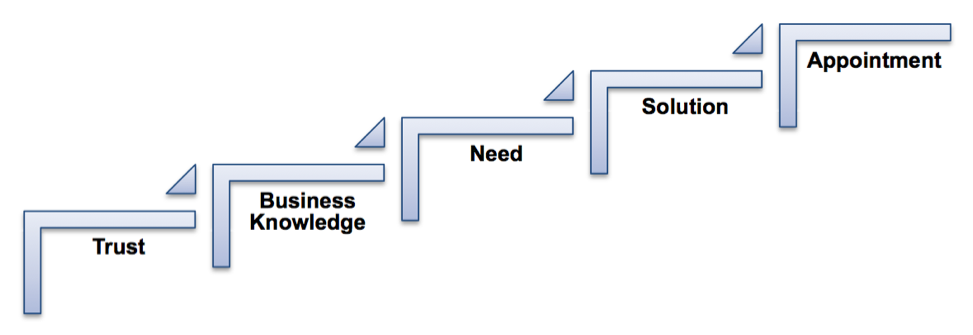
Here are five steps on how to create a referral from your network to increase your sales.

referral sources 5 steps

1. Create trust in your relationships

A referral is a transfer of trust. A member of your network shows that they believe in your business when they give a referral. They are giving a piece of their reputation to your prospect.

The extent to which that this conviction is shared with your prospects has everything to do with how willing members of your network are to roll out the red carpet. Only strong relationships with a solid based of trust will create strong referrals. Build those strong relationships.

Takeaway: Strong relationships = Strong referrals

2. Share your business knowledge

Only 12% of your network can help you with a referral. These people are the members of your network who know you, like you and most importantly, trust you. You and these valued members of your network will need to continually share business knowledge with one another.

Selecting the right members of your network for these 1:1 conversations is key. They must have the right attitude, motivation and be in a strategic position to help. And, of course, you must have the right mindset to manage this conversation. Reciprocity is king here. You are helping one another with referrals, so seek out the ‘givers.’

Takeaway: Referrals come from strategic 1:1 conversations

3. Understand the needs of one another’s prospects

You and your referral source must understand and clearly articulate the needs of one another’s ideal prospect. Armed with this knowledge, you can qualify all referral opportunities for one another. At this point, the closing rate of the referral starts to track above 34%, going north to a 50% closing rate.

Takeaway: Your educated referral source can qualify your prospect for you 

4. Learn about one another’s solutions

Both you and your referral source must be able to articulate your solutions clearly to one another. Learning the elements of your solutions helps with preparing the way to a higher quality referral.

Takeaway: Articulate your solutions clearly = Higher closer rate  

5. Set up an appointment to connect

The overall goal of this process is to create the all-important appointment with the prospect, but make sure the right people are attending. Dedicated referral sources attend one another’s first appointments with the referred prospects whenever possible. This can help you achieve an 80% closing rate.

Takeaway: Make sure you meet together with the prospect and your referral source


Following these steps will help you effectively leverage your referral sources to increase your top line. It’s time to put these steps into action. Which network contacts will you reconnect with to set up your next referral conversation?


Paula Hope, Booked SolidPaula Hope, referral marketing expert, coach, consultant, trainer and author has been helping aspiring professional service providers create the revenue they really deserve for over a decade. Connect with Paula here via email or the Booked Solid website.

A conference

7 Quick Ways to Prepare for a Conference (& Stand Out From the Crowd)

Prepare for a conference

You’ve registered for the event, booked your flight and scheduled the time off in your calendar. Done, right? Not quite. There are some quick and easy things you can do right now to prepare for a conference in the future.

Whether you’re looking for a new business opportunity, sourcing inventory, learning about tools of the trade or running a booth on the exhibition floor, there’s so much more you can prepare that will help you learn more and connect with the right people. Most importantly, you’ll stand out from the crowd, and that can help you close deals.

These seven things will make a big impact.

1. Set a goal for the conference

 prepare for a conference set goals

Time required: 15 – 30 minutes

Go into the conference with a purpose. What do you want to achieve? Who do you want to meet? How will this connect to the big picture strategy for your business?

Write these goals down — and if you’re attending with others, make sure you’re all on the same page. Just like a pilot needs a map and navigation tools, these goals will keep you on the right course.

2. Write on your business cards in advance

 Prepare for a conference business cards

Time required: 10 minutes

Personalize a batch of business cards before you pack your bags. If you have a booth, write your booth number or location, along with the conference name on the back of your card. People will be able to find you easier if you meet them away from the booth, and they’ll remember you when back home updating their contacts.

If you’re on the sales side, you could provide a special “conference-only” discount or product offer on the back of your card. Or simply write your basic goal such as, “Looking to improve our manufacturing automation.” Your card will instantly be seen with more value.

3. Connect on social media in advance

Prepare for a conference social media 

Time required: 30 minutes

Check out the conference schedule and website. If there are keynote speakers, particular vendors and industry experts that will be in attendance, reach out and connect with them online.

Your best bet to start is on LinkedIn and Twitter. Influencers and keynote speakers will usually be listed on the event website, so feel free to reach out and let them know you’re looking forward to their session. Mention you’re hoping to say hello during the event, and this sets you up for a familiar in-person chat when you get to the event. That can be a helpful icebreaker.

4. Start setting up meetings

 Prepare for a conference meetings

Time required: 1 hour

Time will be a hot commodity, and the most prepared attendees will book meetings and prep their schedules in advance. Do a bit of homework to target your must-meet attendees, and then reach out to set up a meeting.

Add all your meetings to your calendar, and include blocks of time dedicated to taking impromptu meetings. Also schedule your preferred keynotes and breakout session directly into a calendar that syncs with your smartphone. Now you’ll have a customized, ready-to-go schedule that you can reference at a moment’s notice.

5. Add the LinkedIn app to your phone

 Prepare for a conference LinkedIn

Time required: 3 minutes

If you haven’t done this already, download the LinkedIn app and login so you’re all set up. This is one of the easiest ways to connect with people in the moment — sometimes even a replacement for exchanging business cards.

At the conference, simply add new connections to LinkedIn when you meet them. This shows you’re actively engaged, taking an interest in building a mutually beneficial relationship, and it can simply help confirm you’re connecting with the right contact. This little tactic will make a follow-up touch-point that much more seamless, and you’ll be a step ahead for a continued relationship after the conference.

6. Prepare for a conference by learning about the city

prepare for a conference boston

Time required: 15 – 30 minutes

If you’re heading somewhere new to you, research the history of the city, main attractions, fun facts and little-known trivia. Why? Aside from finding a great restaurant in the off time, it’s a perfect conversation starter or icebreaker with new contacts.

Undoubtedly, you’ll chat with people about and make casual conversation — discussing the conference center, the hotel, where you’re from and if you’re doing anything else while in town. Having an interesting tidbit will keep your conversation lively, give you a back pocket conversation topic, and most importantly, will make you memorable.

7. Perfect your elevator pitch

Prepare for a conference elevator pitch 

Time required: 30 minutes

You’ve set key goals, are an expert in your field and know the value you can provide others. Wrap those three things up into a 30-second statement that you can easily repeat when you meet new contacts.

Think from your audience’s perspective as you develop this pitch. They will be asking themselves, “What value can this new person provide me?” Answer that question in your elevator pitch — keeping it succinct and bold. People will instantly see what you can offer and want to learn more.


Follow these steps and you’ll be ready to get the most out of your conference experience, connect with new prospects and help grow your business through those new connections.